One platform for the whole air-con job
Vento replaces the clipboard, the spreadsheet, the CAD seat and the follow-up quote with a single workflow — then runs the job, from the dispatch board to the van stock. Purpose-built for UK air-conditioning installers.
Watch it working
Every feature, in under a minute
Narrated tours recorded in the real app. Pick an area of the job to see its tours.
 0:41
Guided site surveys
Every survey done the same way, with nothing missed
Watch the tour 0:42
Heat load & sizing
Room-by-room heat load, worked out on site
Watch the tour 0:44
Room designer
Design the install on a scaled plan, then review it in 3D
Watch the tour 0:41
Multi-split design
Several rooms, one outdoor unit, designed properly
Watch the tour 0:43
Manufacturer catalogue
Every unit you fit, with the numbers that matter
Watch the tour 0:43
F-Gas & compliance
Every F-Gas record in one place, ready for an audit
Watch the tour


Design the system


It knows what
a heat load is.
Not a CRM with an HVAC label


Win it and get paid


Then it runs
the job.
Run the job · Back office · Customers
Run the job
Who’s where, doing what
The board, the route, the check-in and the subcontractor — for the days between a signed proposal and a finished install.
Dispatch board
The week on one board
Drag a survey or install onto an engineer’s day. They’re notified, their calendar updates, and the board shows who’s already full.
Limits — You assign the jobs — it doesn’t schedule them for you.
Watch the dispatch board tour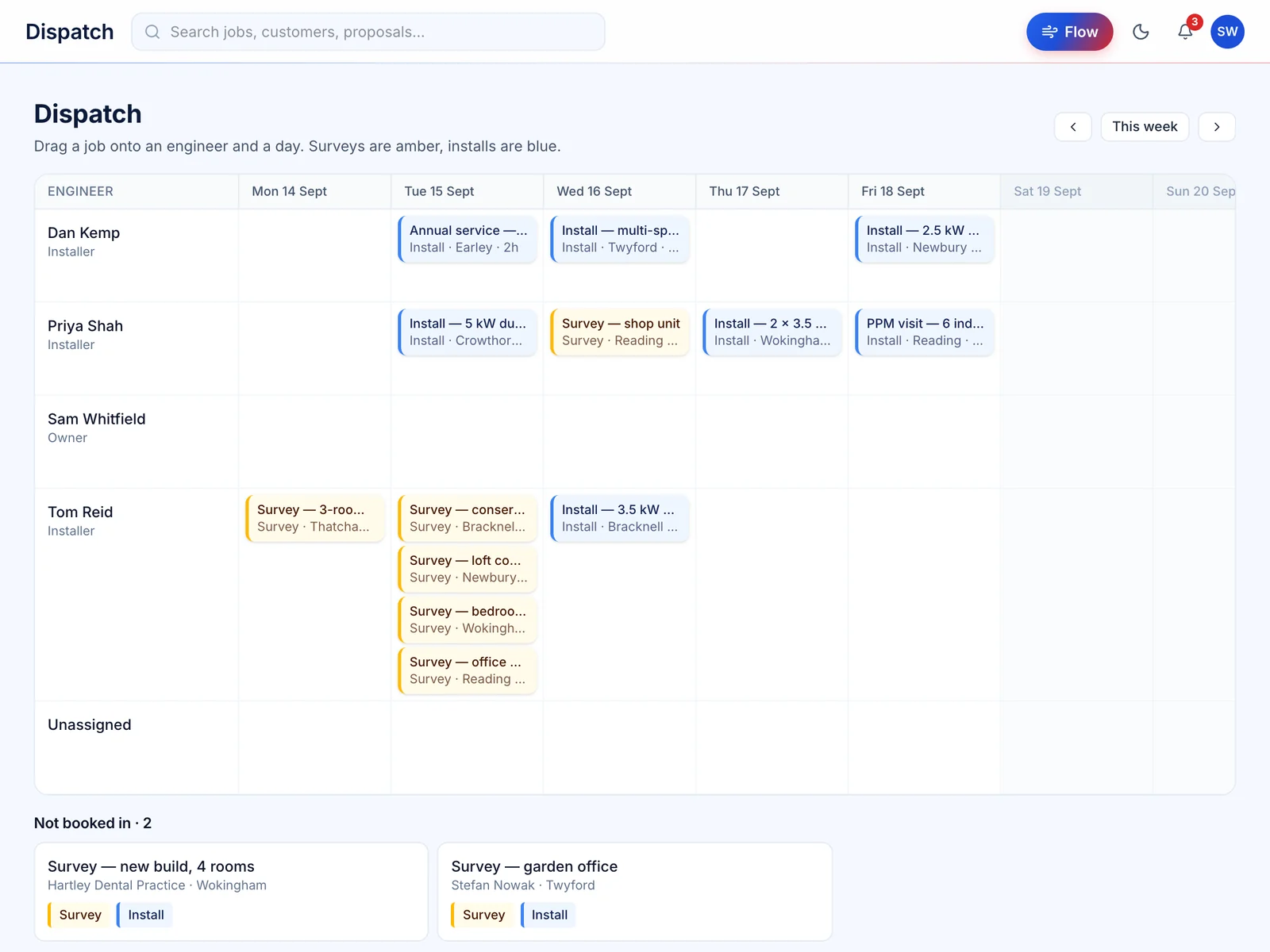
Route planner
The shortest order for the day’s stops
Give it an engineer’s jobs for the day and it suggests the order to drive them in, with the distance saved shown beside the method used to work it out.
Limits — Estimated as straight-line distance × 1.3 at 45 km/h. It isn’t traffic-aware and doesn’t give directions.
Watch the route planner tour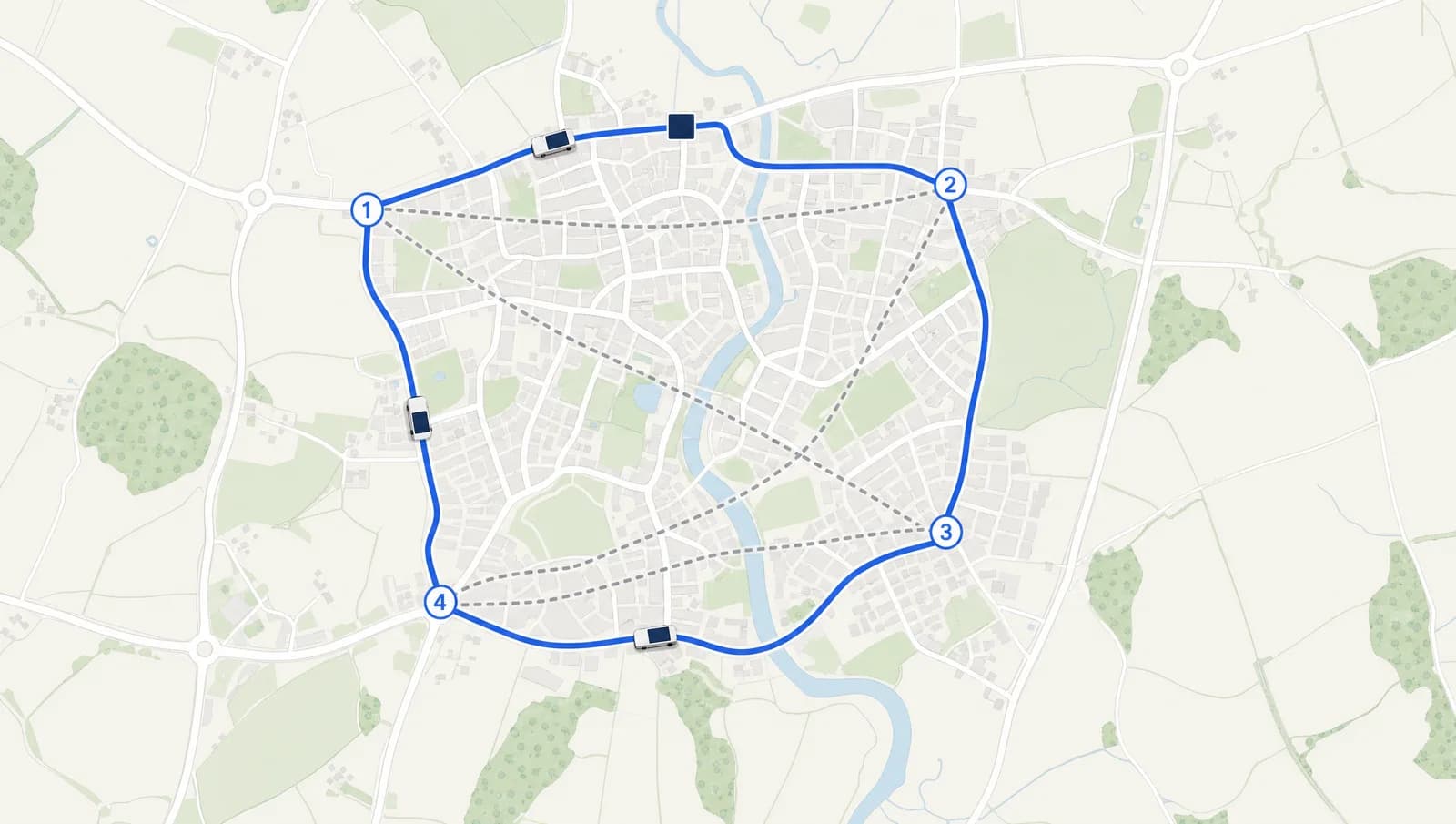
Straight-line distance × 1.3 road factor · est. 56 min driving at 45 km/h
Lone-worker check-ins
A check-in someone notices when it’s missed
An engineer on site alone starts a timer. If they haven’t checked in within 10 minutes of it running out, the office is alerted with their emergency contact — once, not over and over.
Limits — It alerts your office. It doesn’t ring anyone and isn’t a monitored alarm — your own procedure takes over from the alert.
Watch the lone-worker tour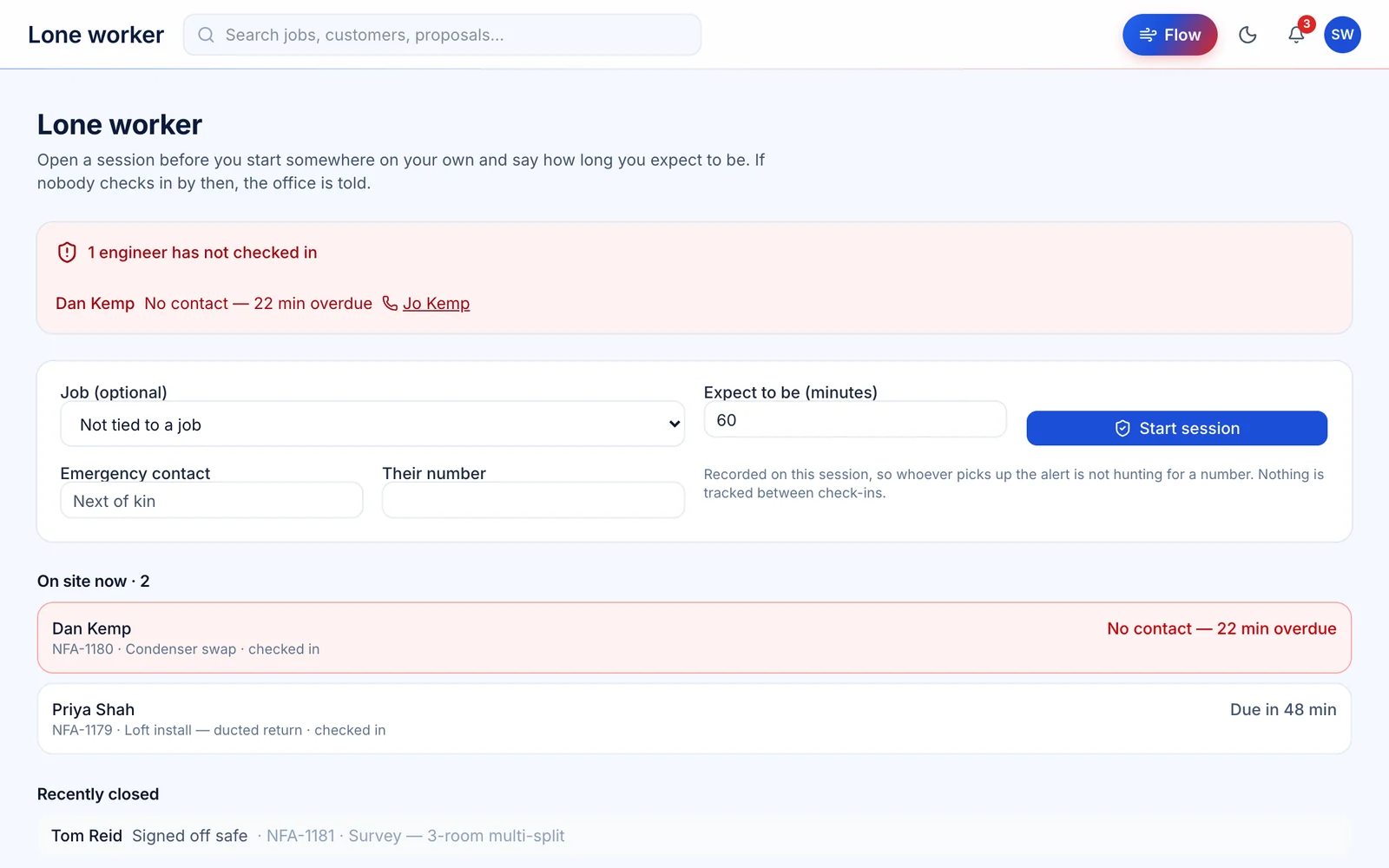
Engineer GPS tracking
Three switches, all of them on
Shows where a van is during a job. It records only when the firm has the add-on, the engineer has agreed to it themselves, and they’re on shift. Withdraw consent and it stops at once, with the record of that consent kept.
Limits — Nothing off shift, no telematics, no driving scores. Buying the add-on switches it on for nobody.
Watch the tracking tourPriya S.
Tom R.
Subcontractor job links
A link for the job, not an account for the firm
Send a subcontractor one job — address, date, scope and agreed price. They upload photos and PDFs back to it, and see the site contact’s number only once they’ve accepted.
Limits — Subcontractors aren’t users. They never see your customer’s name, the contract value, your notes or any other job.
Watch the subcontractor tour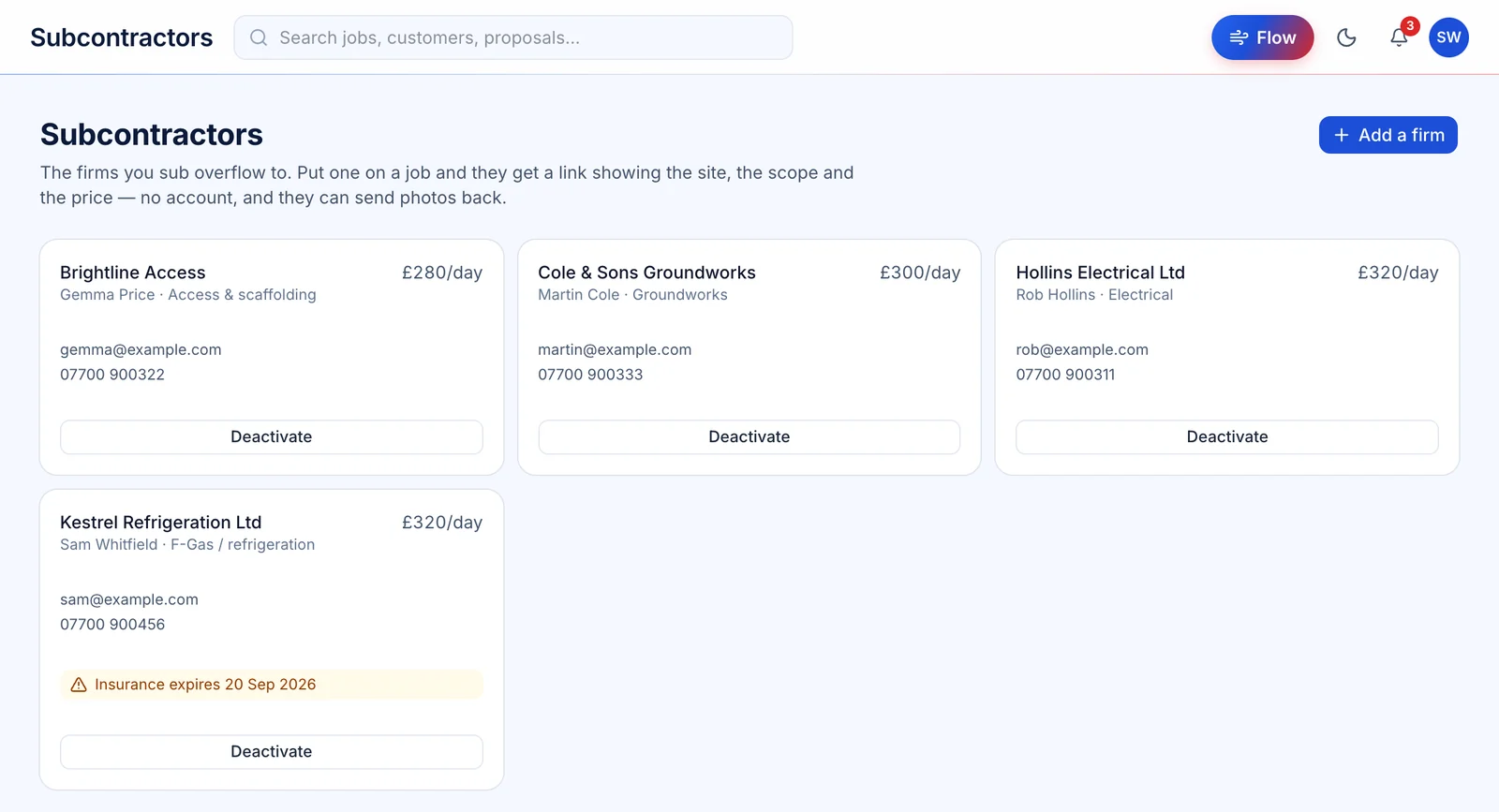
Back office
Stock, orders and contract billing
What’s on each van, what’s on order, what a contract job is worth, and which service plans are due this month.
Stock, vans & stores
Every van, and every metre of pipe on it
Open a van or a store to see what’s on board and what it’s worth, then adjust it on the spot. A level is never typed over: it’s the sum of every delivery, use and count, so it always explains itself.
Limits — It doesn’t sync with a wholesaler’s stock. A stock-take is recorded as an adjustment, not an overwrite.
Watch the van stock tour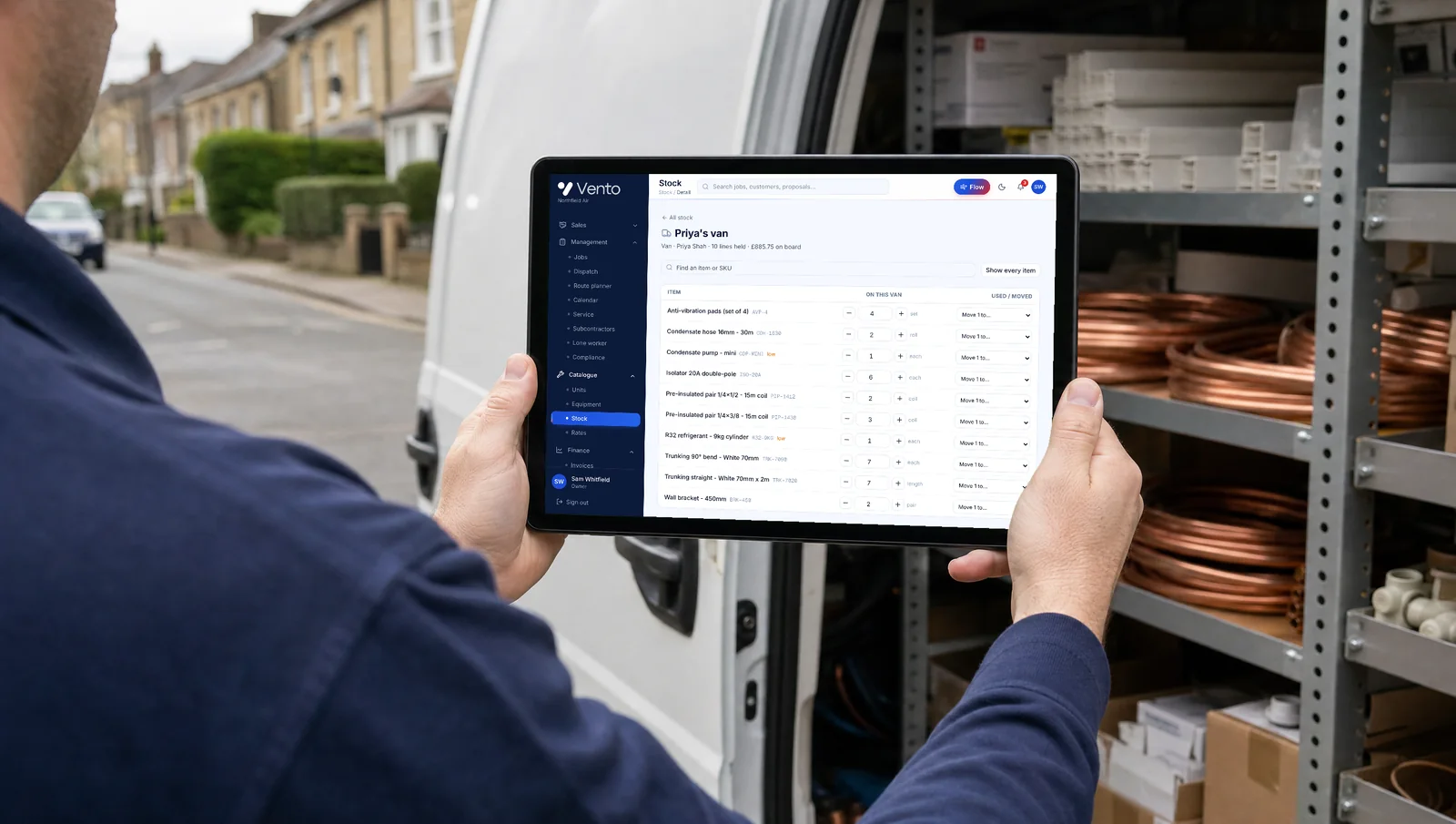
Purchase orders
Ordered, received, invoiced — and matched
Raise a numbered purchase order, receive deliveries against it line by line, and match the supplier’s invoice to what actually arrived before you pay it.
Limits — Orders are raised and tracked in Vento. It doesn’t place them on a supplier’s own system.
Watch the purchase orders tour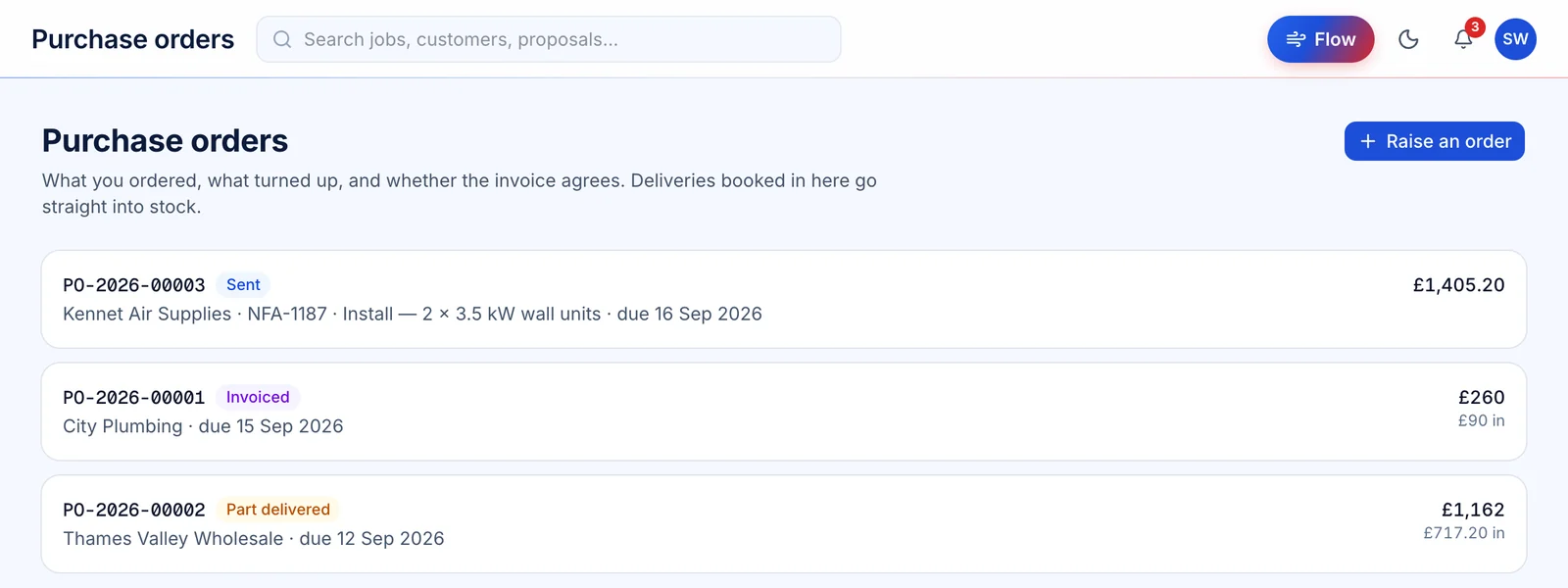
Schedule of Rates
Measure the job against the contract’s rates
Import the client’s schedule, set the contract uplift once, then add lines by code or description. Each rate is rounded to the penny before it’s multiplied out, so every total can be checked line by line.
Limits — NHF and PSA schedules are licensed — you import your own copy. Vento doesn’t supply them.
Schedule of Rates software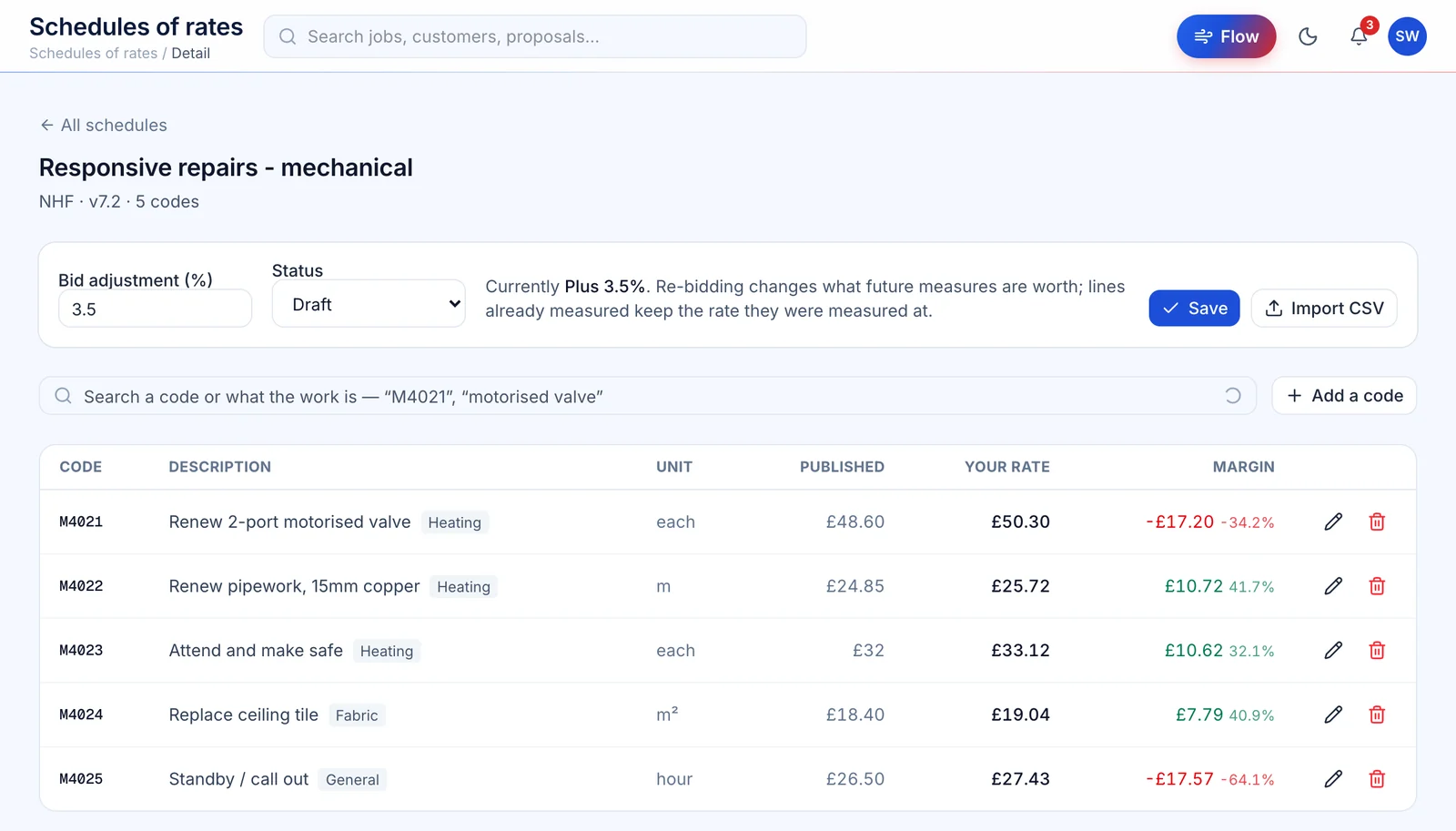
Billing runs
Invoice every contract that’s due, in one go
Vento finds the maintenance contracts that are due and drafts an invoice for each, with VAT. You review the batch before anything is raised, and each contract moves on to its next due date.
Limits — Invoices are raised as due, not paid, and re-running a half-finished batch can’t bill anyone twice.
Watch the billing runs tour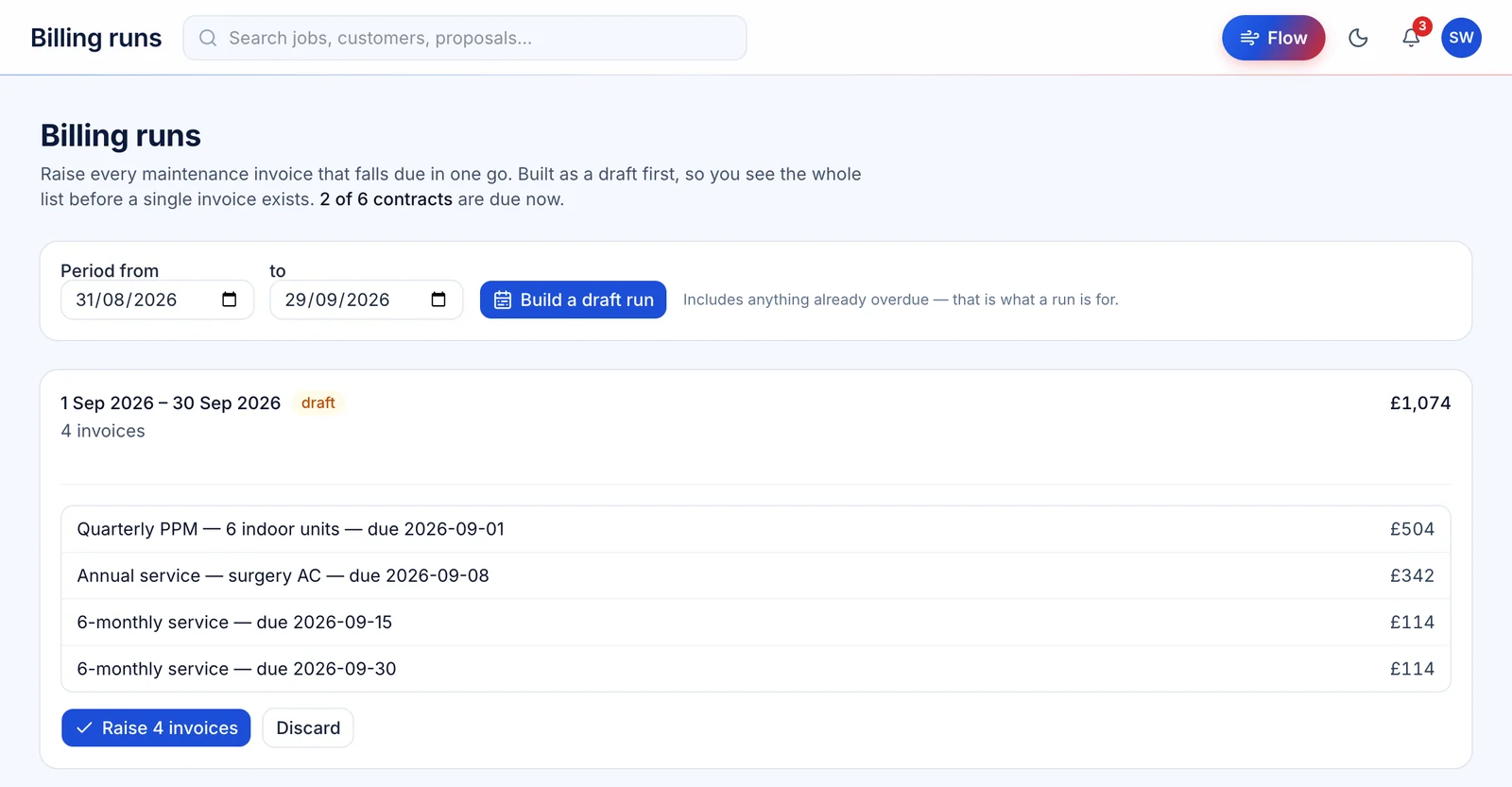
QR asset labels
Print the QR, stick it on the unit
Print asset labels onto standard Avery sheets, positioned to the millimetre so they line up with the die-cut. Scanning one opens that unit’s page, and your engineers sign in to see its service record.
Limits — Three Avery stocks: L7651 (65 a sheet), L7160 (21) and L7163 (14).
Watch the QR labels tourCustomers
One link for everything they’ve bought
Customers see their jobs, dates and payments without an account or a password.
Customer portal
No password, one link, every job
A customer asks for a link and gets one by email, good for 30 days. From it they see every job you have with them, the survey and install dates, their payments and service plan — and can follow a job and pay what’s outstanding.
Limits — Anyone who asks gets exactly the same reply, so the portal can’t be used to find out who your customers are.
Watch the customer portal tour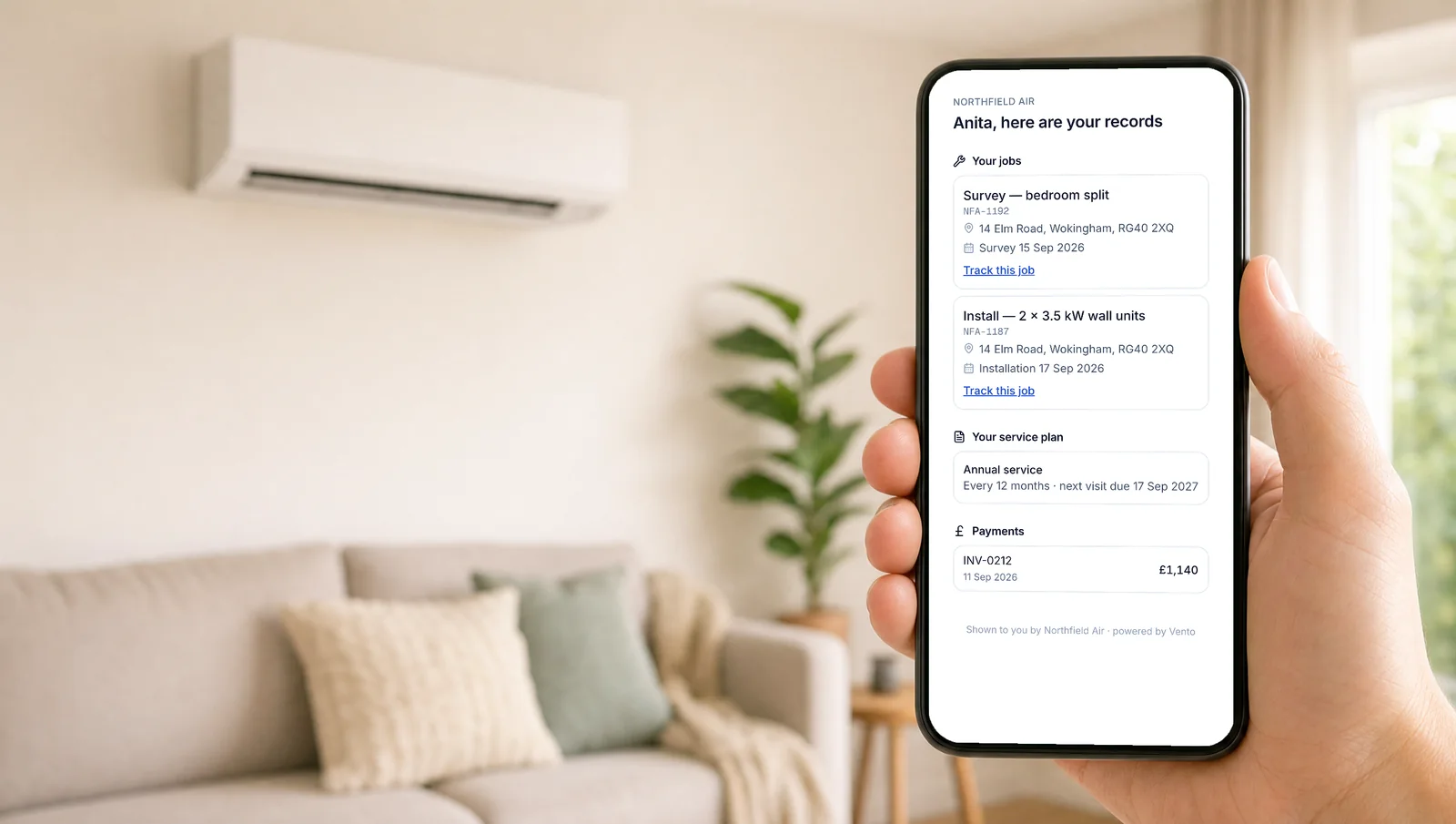
HVAC software, built for air conditioning
Most HVAC and field-service software is built for every trade at once, so it manages jobs well but can't size a system or run a heat-load calculation. Vento is HVAC software specialised for air conditioning: the survey, room-by-room sizing, split and multi-split design, F-Gas and branded proposals are all native to the workflow — no separate calculator, no CAD, no stitched-together stack. For UK installers who do air conditioning as their core work, that's the difference between admin software and a tool that does the engineering too.
Is Vento HVAC software?
Vento is HVAC software specialised for air conditioning. General HVAC and field-service platforms cover many trades but don't size or design systems; Vento is built around the air-con job specifically — room-by-room heat load, split and multi-split design, F-Gas and proposals — so the engineering is native rather than bolted on.
What's the best HVAC software in the UK for air-con installers?
If air conditioning is your core work, the best fit is software built for it: automatic sizing, system design, F-Gas and branded proposals in one place. Vento delivers that as a flat-price UK platform (from £39/mo), rather than a per-user general HVAC/field-service tool that still needs a separate heat-loss calculator.
Does Vento replace general field-service or HVAC software?
For air-conditioning installers, yes. It covers the survey-to-payment workflow (jobs, scheduling, quoting, invoicing, payments) and the running of the work after it — dispatch, van stock, purchase orders, subcontractors — and adds the air-con engineering and compliance a general HVAC tool leaves out, so you don't run two systems.
Does Vento handle stock and van stock?
Yes. Every van and store has its own stock, kept from a ledger of every delivery, use and count, so a level always explains itself. Purchase orders are numbered, received against, and matched to the supplier's invoice. It doesn't sync with a wholesaler's own stock system.
Can subcontractors see my customers' details?
No. A subcontractor gets a link to one job — address, date, scope and agreed price — and the site contact's number only once they accept. They never see the customer's name, the contract value, your notes or any other job.
Is engineer tracking always on?
No. It's a £15/mo add-on, and buying it switches it on for nobody. It records only for engineers who have agreed to it themselves, and only while they're on shift. Withdrawing consent stops it immediately.
Want the numbers? See pricing, try the size calculator, read about field service, or compare Vento with other tools .
Win more installs, with less admin.
Start your 14-day free trial — survey, design, quote and get paid on one platform.
Start free trial14-day free trial